
Staff invitation email
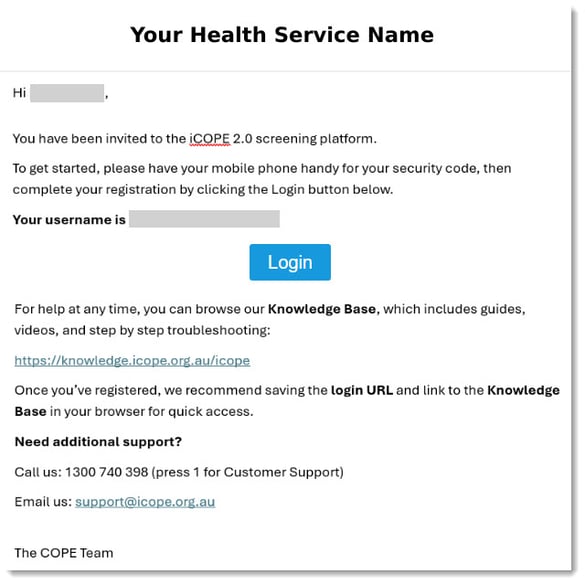
You will be sent an email inviting you to register as a clinician or staff member for your health service to use iCOPE 2.0. The email will look similar to this:
Registration process
To register, follow the steps below:
- Click the Login button in your email to navigate to your health service's iCOPE 2.0 website.
- NOTE: If your health service uses Single Sign-on (SSO) to log in to iCOPE, you will be automatically logged in at this point and do not need to follow the rest of the steps below.
- Enter your mobile number and click the Send Code button.
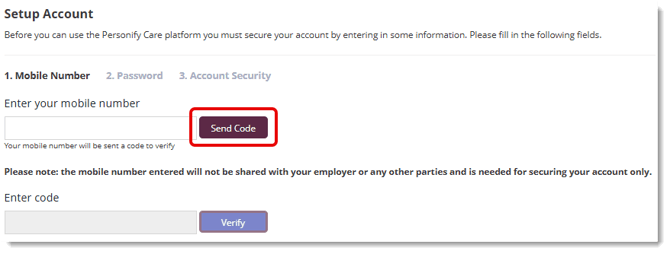
- Enter the code you received via SMS and click the Verify button.
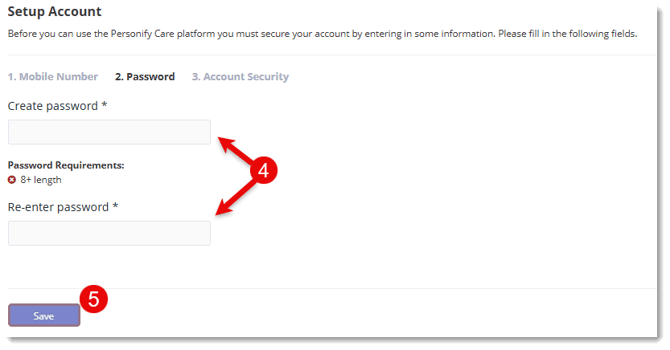
- Enter your password twice as instructed. Your password requirements are set up in iCOPE 2.0 as per your health service's instructions.
- Click the Save button.
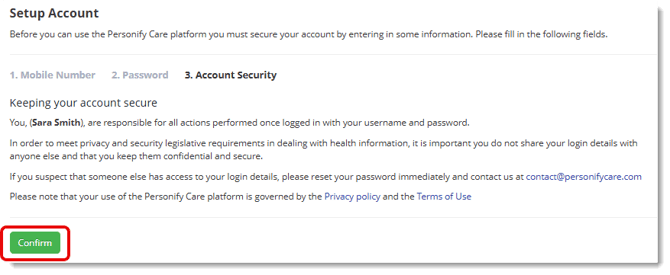
- You will be asked to agree to the platform Privacy policy and Terms of Use. Click Confirm when you have read these.
- Your iCOPE 2.0 account has now been registered. Don't forget to bookmark the URL in your browser for easy access.
© Centre of Perinatal Excellence